
Let’s be honest:
You still get handed business cards. At trade shows. Client lunches. Industry mixers. Even elevator rides.
And despite good intentions—“I’ll enter this tonight!”—too many end up:
→ Buried in a wallet for weeks
→ Lost in a desk drawer
→ Snapped on your phone… then buried in 4,000+ photos
The result? Missed follow-ups. Forgotten connections. Wasted opportunities.
But here’s the good news: You don’t need a business card scanner anymore.
In 2025, the fastest, most reliable way to get a card into your CRM isn’t hardware—it’s smart workflow design.
Let’s break down why—and what actually works.
📵 Why Dedicated Scanners (and OCR Apps) Fall Short
Most “business card scanner with CRM integration” tools promise magic: snap → extract → sync.
Reality?
❌ Poor accuracy: “Al Faisaliah” becomes “AI Faisaliah” → duplicate contact
❌ Manual cleanup: You still edit 3–5 fields per card
❌ No context: Card = contact record. But where did you meet? What did you discuss?
❌ Silent failures: Sync fails? You won’t know until it’s too late.
Even top-tier scanners (like CamCard or Microsoft Lens) treat the card as the end—not the start—of a relationship.

✅ The Smarter Path: Turn the Exchange into the Entry
Instead of scanning after the conversation—capture the intent during it.
Here’s how teams using WORKESK do it—no scanner required:
1. Give your card a QR code that creates a CRM record for them.
Add a QR code (linked to your WORKESK BioLink) on the back of your card:
→ They scan it → save your contact and book a meeting in one tap
→ That booking auto-creates a lead in your CRM—with name, email, meeting topic, and timestamp
You get their info before you part ways. And it’s 100% accurate.
2. For their card: Snap + Smart AI + Instant Action
In the WORKESK mobile app:
→ Tap “+” → “Scan Business Card”
→ Take photo (no perfect alignment needed)
→ AI extracts name, company, email, phone
→ You add one field: “Met at: ______” (e.g., “ADGM Networking,” “Gold Expo Booth #12”)
→ Tap “Save” → contact created + task assigned: “Follow up within 24h”
Total time: under 12 seconds. And the context? Preserved.
🔄 3. Automate the Follow-Up—So No Card Goes Cold
The real value isn’t in capturing the card. It’s in acting on it.
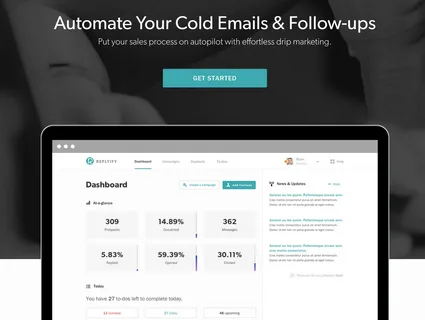
With WORKESK’s workflow automation, set one rule:
→ IF new contact added AND source = “Business Card”
→ THEN assign task: “Send personalized follow-up”
→ AND send email template: “Great meeting you at [Event]—here’s what we discussed…”
→ AND log in CRM: “Initial Contact – Business Card”
Now, even if you’re swamped, the system ensures no lead slips through.
One brokerage firm increased post-event conversion by 58%—just by automating the 24-hour touchpoint for all card-based leads.
🧠 Bonus: Flip the Script—Stop Collecting Cards Altogether
The most efficient business card scanner?
One you never use.
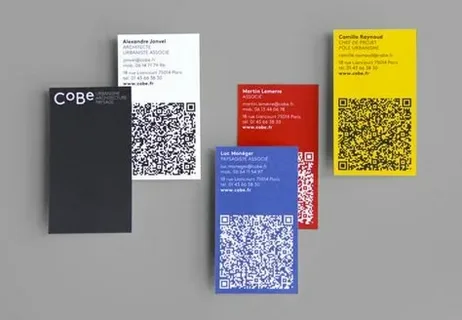
With WORKESK BioLinks, your card becomes digital-first:
🔹 Front: Your name, title, company
🔹 Back: QR code + “Scan to save my contact, see availability, or book a meeting”
They scan → instantly save you → book time → trigger CRM record.
You walk away with a committed next step—not just a slip of paper.
A business card isn’t obsolete.
The process around it is.
When your CRM doesn’t just store contacts—but activates them—you turn fleeting handshakes into tracked, nurtured, revenue-ready relationships.
And when it’s part of a full business management software like WORKESK—where CRM, project tracking, e-invoicing, and team collaboration software work as one—you don’t manage data.
You build momentum.
👉 Ready to retire the scanner drawer?
Try WORKESK’s mobile card capture + automation—free for 14 days: workesk.com
We’ll even help you design your QR-enabled card: support@workesk.com