
If you’re still using your personal phone to text clients, chase payments, confirm appointments, or send job updates — you’re not just unprofessional.
You’re risking:
✅ Mixing up personal and business messages
✅ Missing critical client texts in a sea of notifications
✅ Losing track of conversations across multiple devices
✅ Forgetting to follow up because there’s no system
And if you’re a small business owner, contractor, service provider, or team leader — you need business texting software that works with your workflow, not against it.
Enter: WORKESK.
Not just another SMS tool. Not just another CRM. Not just another project manager.
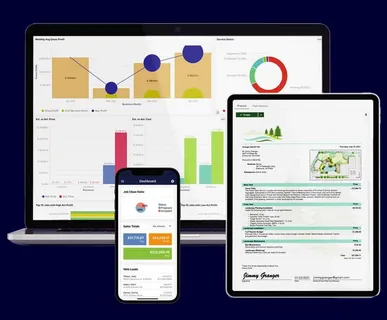
It’s the all-in-one business operating system where texting isn’t an afterthought — it’s built into your daily operations.
—

—
💡 Why Most Business Texting Software Falls Short
Many tools let you send texts. Few help you manage them — especially when your team works across projects, clients, or hourly rates.
Here’s what most “business texting software” misses:
❌ No connection to your CRM (so you’re retyping client info every time)
❌ No link to projects or hours (so you don’t know what to text about)
❌ No automation (so you’re manually sending reminders and follow-ups)
❌ No team sync (so sales doesn’t know finance is chasing a client)
❌ No invoice or expense integration (so your books stay disconnected)
WORKESK fixes all that — because texting shouldn’t be isolated. It should be part of your entire business engine.
—
✅ How WORKESK Makes Business Texting Simple (Even for Non-Techies)
Here’s how it works — no spreadsheets, no IT tickets, no stress:
🔹 Send Professional Texts from Your Dashboard
Auto-fill client details from your CRM. Pull project names, due dates, or invoice numbers directly from your task tracker.
—
🔹 Track Every Conversation — No More Guessing
See which texts are read, replied to, or ignored — all in one dashboard. Filter by client, date, or status.
🔹 Automate Payment & Appointment Reminders
Set rules: “Send reminder 24 hours before appointment,” “Follow up 3 days after invoice sent,” “Escalate to manager after 7 days.” All automated. All polite.
🔹 Sync With Invoicing & Projects
Text a client about their invoice? WORKESK automatically logs the interaction. Assign a task? It ties back to the conversation.
—
🚀 Who Needs This? (Spoiler: Every Service Business That Talks to Clients)
If you’re:
- A contractor confirming job start times
- A landscaper reminding clients about weekly visits
- A cleaning service sending post-job photos and payment links
- A solopreneur tired of switching between apps just to communicate
…then you need business texting software that does more than send SMS.
You need WORKESK — where texting is connected to your projects, your clients, your team, and your bottom line.
—

—
Ready to Stop Juggling Personal Texts?
Start talking to clients — professionally, efficiently, and in sync with your entire business.
👉 Explore WORKESK — the smart business texting software for modern teams — at workesk.com
Questions? Email us at support@workesk.com — we’ll help you set it up right.
Your next text shouldn’t be a gamble. It should be your next win.